
General information
Terms and definitions
Access code is a unique identifier and a set of passwords for embedding into the protected program, owned by the developer using Guardant technologies.
Obfuscation of public interfaces – symbol obfuscation of public methods and properties.
Code flow obfuscation – obfuscation level of the protected program code execution sequence, in which the code is divided into several blocks, fake blocks are added to it, and their execution sequence is hidden from analysis.
Symbol obfuscation – replacement of type names, events, properties and methods with a random set of characters.
Strings encryption – encryption of string constants in the protected program.
The Settings menu is designed to:
- select protection methods for native and .NET programs;
- configure dynamic libraries required for the protected program to operate (hereinafter referred to as dynamic libraries);
- select an access code for embedding in the protected program;
- configure the display of messages to the user of the protected program;
- configure dongle monitoring.
Logically the menu can be divided into the following sections:
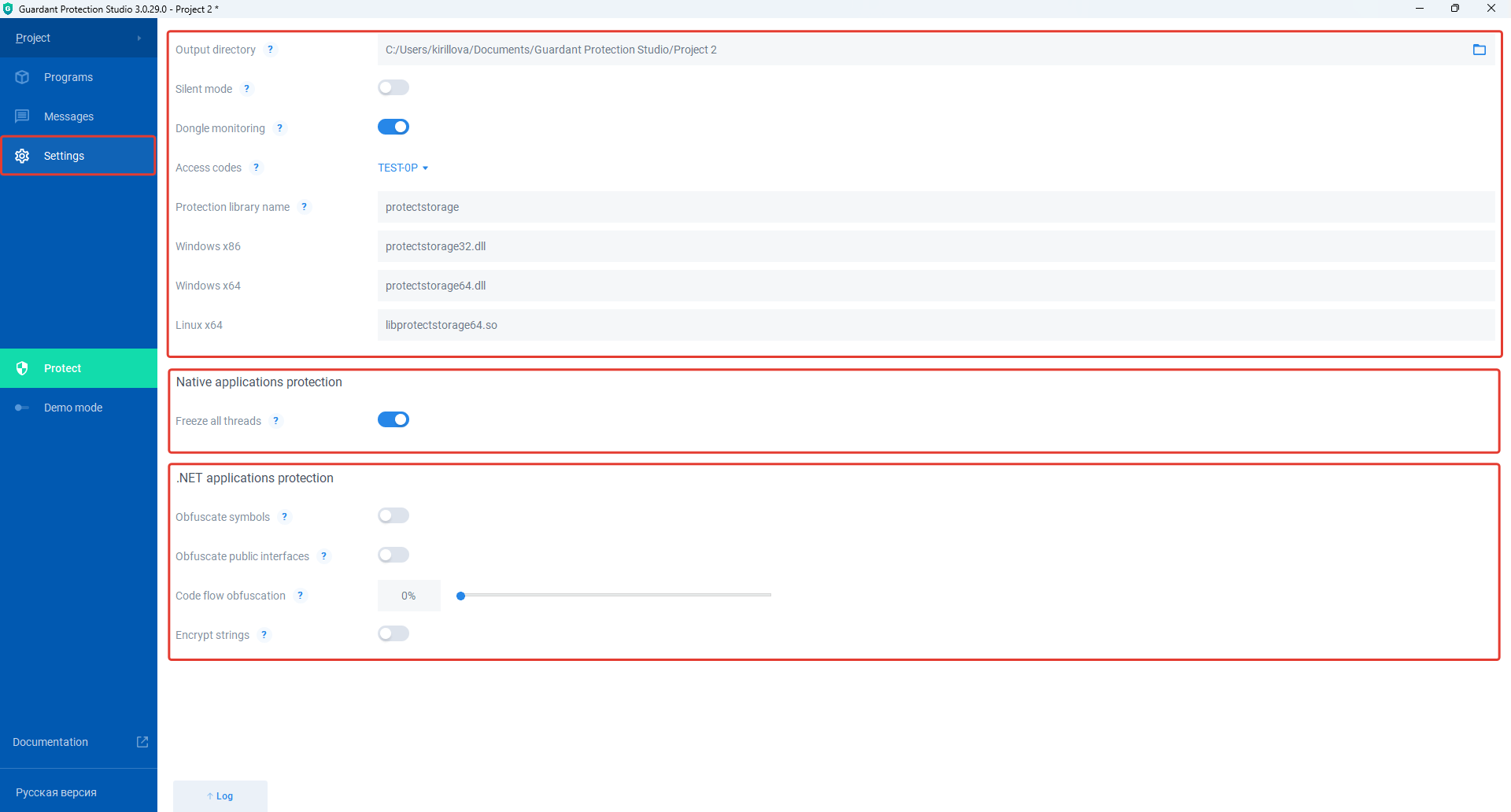
General settings
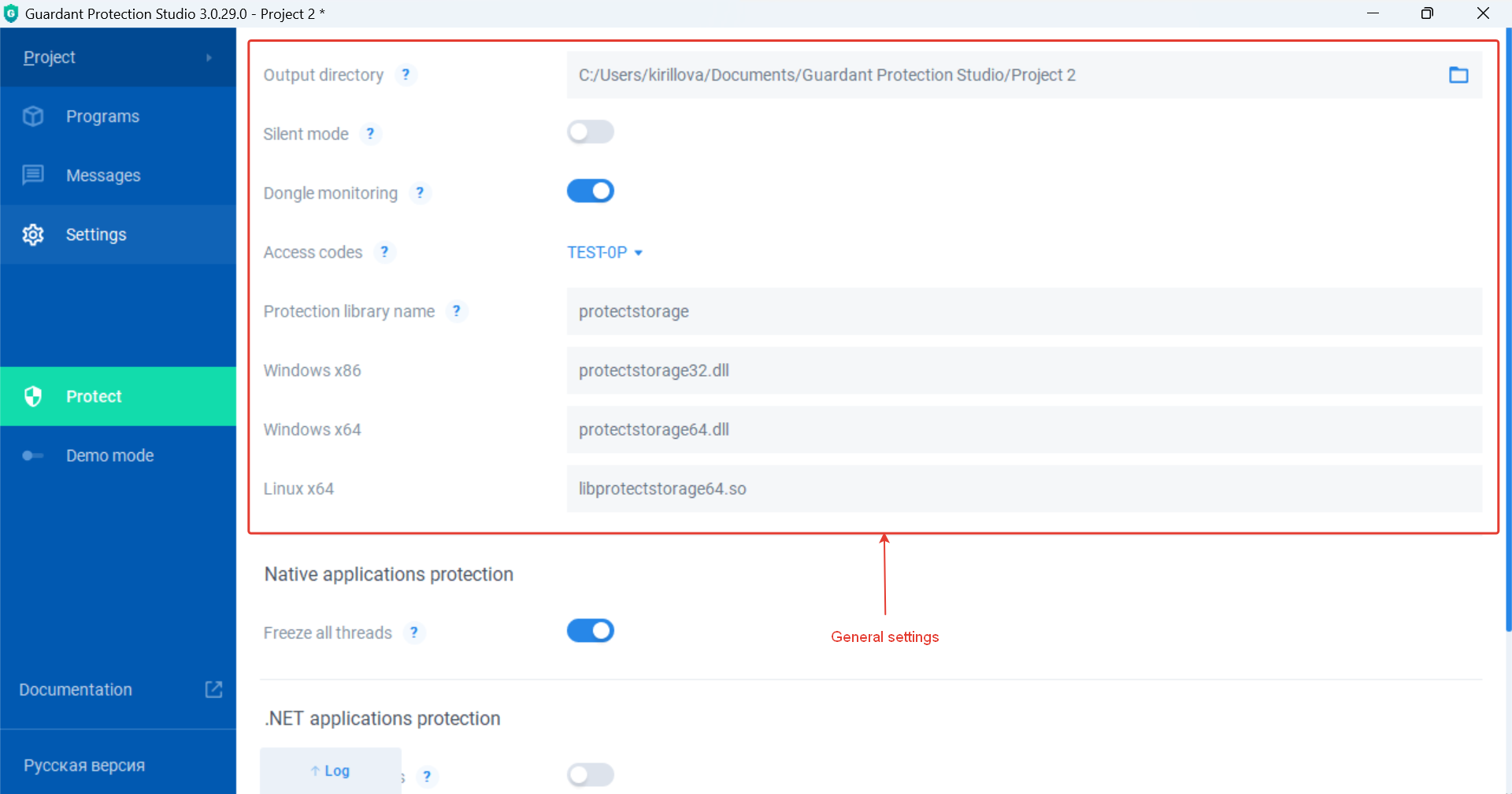
The section contains general settings for native and .NET applications and consists of the following subsections:
- Output directory;
- Silent mode;
- Dongle monitoring;
- Access codes;
- Protection library name;
- Windows x86;
- Windows x64;
- Linux x64.
Output directory
Subsection for directory configuration in which dynamic libraries will be saved, as well as the result.xml file with the program protection report.
The result.xml file is generated only for native programs protection.
By default, dynamic libraries and the report file are saved in the Protection project directory – C:\Users\[PC user name]\Documents\Guardant Protection Studio\Project [Protection project number].
To change the directory, follow the steps below:
- Next to the Output directory field, click the icon
 .
. - In the Choose the result directory window, select the desired directory and click Select folder.
- Save Protection project.
Silent mode
Subsection for the output messages configuration about events related to the license for the user of the protected program.
To enable message blocking, it is necessary to follow the steps:
- Set the switch next to the Silent mode field to the active state
 .
. - Save the Protection project.
To disable message blocking, it is necessary to follow the steps
- Set the switch next to the Silent mode field to the inactive state
 .
. - Save the Protection project.
Dongle monitoring
Subsection for the configuration of the stream use for key extraction monitoring from a PC. In this case, the key check will be performed immediately, but it will be impossible for the .NET program to intercept the exception.
To disable monitoring, it is necessary to follow the steps:
- Set the switch next to the Dongle monitoring field to the inactive state .
- Save the Protection project.
To enable monitoring, it is necessary to follow the steps:
- Set the switch next to the Dongle monitoring field to the active state .
- Save the Protection project.
Access codes
Подраздел выбора кода доступа для встраивания в защищаемую программу.
Для выбора кода необходимо:
- В раскрывающемся списке рядом с полем Коды доступа (Access codes) выбрать необходимый код.
- Сохранить Проект защиты.
Protection library name
Подраздел для настройки общего имени динамических библиотек.
По умолчанию общее имя – protectstorage.
Для его изменения необходимо:
- Рядом с полем Имя библиотеки защиты (Protection library name) вместо protectstorage ввести новое имя библиотек.
- Сохранить Проект защиты.
В зависимости от разрядности программы и семейства операционных систем в комплект поставки защищенной программы необходимо включить соответствующую динамическую библиотеку.
Windows x86
Подраздел отображает имя динамической библиотеки необходимой для работы защищенной программы в ОС Windows x86.
Имя библиотеки имеет следующую структуру:
[общее имя динамических библиотек][разрядность программы].dll
Его нельзя изменить вручную. Оно изменяется автоматически при смене общего имени динамических библиотек.
Windows x64
Подраздел отображает имя динамической библиотеки необходимой для работы защищенной программы в ОС Windows x64.
Имя библиотеки имеет следующую структуру:
[общее имя динамических библиотек][разрядность программы].dll
Его нельзя изменить вручную. Оно изменяется автоматически при смене общего имени динамических библиотек.
Linux x64
Подраздел отображает имя динамической библиотеки необходимой для работы защищенной программы в ОС Linux x64.
Имя библиотеки имеет следующую структуру:
lib[общее имя динамических библиотек][разрядность программы].so
Его нельзя изменить вручную. Оно изменяется автоматически при смене общего имени динамических библиотек.
Native applications protection
Раздел предназначен для настройки мгновенной приостановки работы защищенной нативной программы при извлечении ключа Guardant из ПК – приостановки потоков. Применяется для защиты исполняемых файлов в формате PE.
Для включения приостановки потоков необходимо:
- Установить переключатель в активное состояние .
- Сохранить Проект защиты.
Для отключения приостановки потоков необходимо:
- Установить переключатель в неактивное состояние.
- Сохранить Проект защиты.
.NET application protection
Раздел предназначен для выбора методов защиты .NET программ.
Утилита поддерживает следующие методы:
- Обфускация символов (obfuscate symbols).
- Обфускация внешних интерфейсов (obfuscate public interfaces).
- Обфускация потока выполнения (code flow obfuscation).
- Шифрование строк (encrypt strings).
Для включения методов 1, 2, 4 необходимо:
- Установить переключатель рядом с соответствующим методом в активное состояние .
- Сохранить Проект защиты.
Для отключения методов 1, 2, 4 необходимо:
- Установить переключатель рядом с соответствующим методом в неактивное состояние .
- Сохранить Проект защиты.
Для включения метода 3 необходимо:
- Рядом с полем Обфускация потока выполнения (Code flow obfuscation) ввести степень запутывания последовательности выполнения кода (в процентах). Максимальное значение – 100.
- Сохранить Проект защиты.
Для отключения метода 3 необходимо:
- Рядом с полем Обфускация потока выполнения (Code flow obfuscation) ввести значение степени запутывания последовательности выполнения кода равную 0.
- Сохранить Проект защиты.
